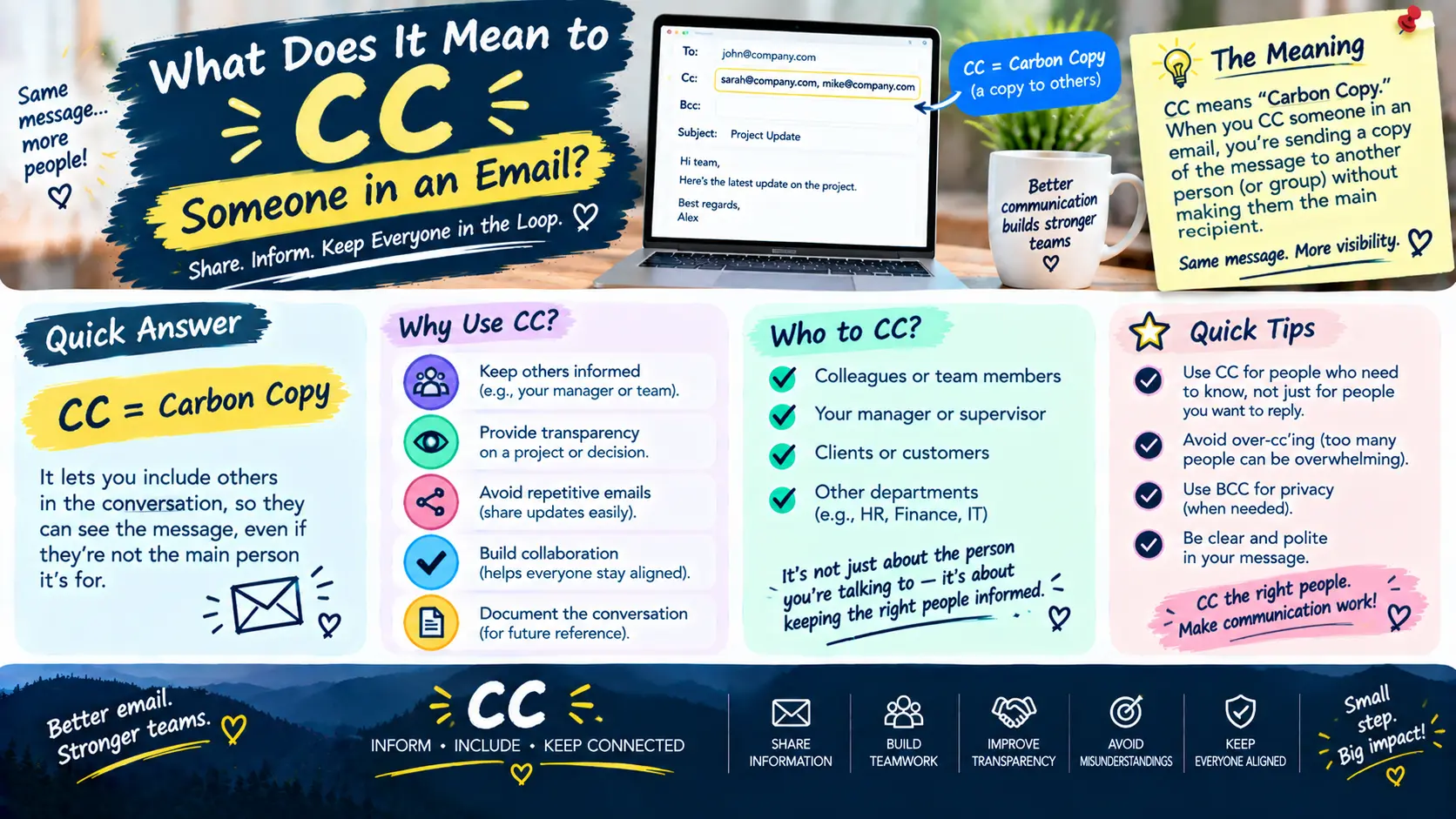
What Does It Mean to CC Someone in an Email?
If you have ever written an email and wondered what the CC field is for, you are not alone. CC is one of the most common features in email, but many people are unsure about when to use it or what it means for the person receiving the message.
CC stands for “carbon copy.” When you CC someone in an email, you send that person a copy of the message while usually directing the main message to someone else.
For example, you might email a coworker about a project and CC your manager so the manager stays informed. The manager receives the email, but the coworker may still be the person expected to handle the main request.
Understanding CC is especially useful for workplace, school, business, and everyday communication. It can help you keep the right people informed without making everyone a primary recipient.
What Does It Mean to CC Someone in an Email?
To CC someone in an email means to include that person as a visible recipient who receives a copy of the message.
The person entered in the CC field normally receives the same email as the primary recipient. They can generally see the sender, the other visible recipients, and the contents of the message.
For example:
- To: Sarah
- CC: James
- Subject: Friday Project Update
Sarah may be the person expected to review or respond to the project update. James is copied so he knows what is happening.
Simple Definition of CC
CC means sending someone a copy of an email for their information or awareness.
A CC recipient may be involved in the topic, but they are not necessarily the person responsible for responding or completing an action.
CC is commonly used when someone should know about a conversation without being the main person addressed.
What Does CC Stand For?
CC stands for carbon copy.
The expression comes from older methods of written correspondence. Before digital email became common, people could use carbon paper to create a duplicate copy of a document while writing the original.
The duplicate could then be sent to another person for their records or information.
Modern email does not use carbon paper, but the term CC remained as a familiar way to describe sending an additional copy of a message.
What Happens When You CC Someone?
When you add an email address to the CC field, that person receives a copy of the email.
The CC recipient can generally see the other recipients listed in the To and CC fields. Their email address is not normally hidden from those other visible recipients.
Being CC’d can mean several things depending on the situation. The person might simply need to stay informed, monitor the conversation, provide context, or be aware of a decision.
It does not automatically mean that the person must reply.
What Is the Difference Between To, CC, and BCC?
The To, CC, and BCC fields all identify email recipients, but they serve different purposes.
| Email Field | Main Purpose | Recipient Visibility |
|---|---|---|
| To | Primary recipient or people expected to act | Visible |
| CC | People who should be informed | Visible |
| BCC | Hidden recipients | Hidden from other recipients |
Knowing this distinction makes email communication much easier.
What Does the “To” Field Mean?
The To field is generally used for the main recipient or recipients of an email.
These are often the people who need to read the message, answer a question, complete a task, or make a decision.
For example, if you email your coworker asking them to send a report, that coworker’s address would normally go in the To field.
What Does the “CC” Field Mean?
The CC field is generally used for people who should receive the message but are not necessarily the main person being addressed.
For example, you could email a colleague about a project and CC your supervisor so the supervisor knows about the update.
A useful way to think about CC is:
To = people directly involved in the request.
CC = people who should be kept informed.
This is a general guideline rather than an absolute rule because workplace expectations can vary.
What Does the “BCC” Field Mean?
BCC stands for blind carbon copy.
A BCC recipient receives a copy of the email, but their address is hidden from the other recipients.
BCC can be useful when you need to send the same message to multiple people without revealing everyone’s email address to one another.
For example, an organization might use BCC when sending a general announcement to a large group of people who do not need to see each other’s addresses.
To vs. CC vs. BCC at a Glance
The easiest distinction is:
To: “This email is directly for you.”
CC: “I want you to know about this.”
BCC: “I want you to receive this, but other recipients should not see your address.”
These meanings can overlap depending on the situation, but they provide a useful starting point for deciding where an email address belongs.
When Should You CC Someone in an Email?
You should generally CC someone when they have a legitimate reason to be aware of the conversation but are not necessarily the primary person responsible for it.
When Someone Needs to Stay Informed
One of the most common reasons to use CC is to keep someone updated.
For example, suppose you are working with a customer and your manager wants to stay informed about the project. You might send the customer an email and CC your manager.
Your manager can follow the conversation without needing to be directly addressed in every sentence.
When Someone Is Involved but Does Not Need to Respond
CC is also useful when someone has an interest in the information but does not need to take immediate action.
For example:
To: Project Coordinator
CC: Marketing Manager
Subject: Updated Campaign Schedule
The project coordinator may need to review the schedule, while the marketing manager simply needs to know about the update.
When You Want to Keep a Record of Communication
CC can also help keep relevant people aware of important communications.
For example, if you are coordinating a project with several departments, copying the appropriate people can make it easier for everyone to understand what has already been discussed.
However, adding unnecessary people to every message can create clutter, so CC should still be used thoughtfully.
When Multiple People Need the Same Information
If several people need the same information but only one or two are expected to take action, CC can be useful.
For example, a team leader could email an employee about a task and CC another team member who needs to know about the deadline.
When Should You Not CC Someone?
CC is useful, but copying people unnecessarily can make email communication less efficient.
Avoid Unnecessary CCs
You do not need to CC someone simply because they are connected to the same department or organization.
If the information has no meaningful relevance to them, leaving them off the email may be more appropriate.
Do Not Use CC to Pressure Someone
CC should not automatically be treated as a way to pressure another person into responding.
For example, copying a senior manager on every minor disagreement can unnecessarily escalate a conversation.
A better approach is to include people because they genuinely need the information or have a relevant role.
Avoid CC When Privacy Matters
CC is not designed for hiding recipients.
Because CC addresses are generally visible to the other recipients, you should avoid using it when the recipient list needs to remain private.
In those situations, BCC or another communication method may be more appropriate.
Do Not CC People Who Have No Relevant Role
Before adding someone, consider whether the information will actually help them.
If a person has no involvement in the subject and does not need to know about it, adding them can contribute to unnecessary email traffic.
Does a Person in CC Need to Reply?
Not necessarily.
Being CC’d generally means the person is being kept informed. It does not automatically mean they are expected to respond.
For example:
To: Alex
CC: Maria
Subject: Meeting Time Confirmed
Maria may only need to know that the meeting time has been confirmed.
However, the situation can change if the email specifically asks Maria for information or action.
For example:
Maria, could you please confirm whether the presentation is ready?
In that case, Maria has been given a direct request even if she appears in the CC field.
The content of the email is more important than the CC label alone when determining whether a response is expected.
Does CC Mean Someone Is Responsible for the Email?
No. Being CC’d does not automatically make someone responsible for the email or the task being discussed.
The To field, message wording, previous communication, and workplace expectations can help establish who is responsible for an action.
For example, if an employee asks a supplier for an invoice and CCs their manager, the employee may still be the person responsible for following up.
The manager is simply being kept informed.
Can CC Recipients See Each Other?
Yes. In a normal email, recipients listed in the To and CC fields can generally see the other visible recipients.
For example:
- To: alex@example.com
- CC: maria@example.com
- CC: david@example.com
Alex, Maria, and David can generally see that the other two people received the message.
This is one of the major differences between CC and BCC.
A BCC recipient’s address is hidden from the other recipients.
What Does CC Mean in Professional Emails?
CC is particularly common in professional communication.
It can help teams maintain awareness of projects, decisions, deadlines, meetings, and important updates.
CC in Workplace Communication
In a workplace, you might CC:
- A manager
- A team member
- A project coordinator
- A supervisor
- A department representative
- A colleague who needs the information
The goal should generally be to keep relevant people informed without unnecessarily expanding the recipient list.
CC in Business Communication
Businesses frequently use CC for:
- Project updates
- Customer communication
- Meeting follow-ups
- Status reports
- Scheduling
- Documentation
- Internal announcements
For example, an employee might communicate directly with a client while copying a colleague who is helping with the account.
CC in School or Academic Emails
Students and educators may also use CC.
For example, a student might email a teacher about a project and CC a relevant administrator when appropriate.
A teacher might also CC another staff member when that person needs to be aware of the communication.
The same basic principle applies: the person in CC receives the message for awareness or involvement, but the email does not necessarily require a response from them.
Examples of How to CC Someone in an Email
Understanding examples makes the difference between To and CC easier to recognize.
Example 1: CCing a Manager
Suppose an employee sends a project update to a coworker.
To: Jordan
CC: Manager
Subject: Project Update
Jordan may be responsible for reviewing the update, while the manager is copied to stay informed.
Example 2: CCing a Coworker
Imagine you are communicating with a supplier about an order, but another coworker is responsible for tracking deliveries.
You could put the supplier in the To field and your coworker in CC.
This allows your coworker to follow the conversation without necessarily becoming the main person responsible for the email.
Example 3: CCing a Client
Suppose an employee sends a business update to a colleague and needs the client to remain aware of the discussion.
Depending on the situation, the client might be included in the To or CC field.
The correct placement depends on whether the client is a primary participant or simply needs visibility.
Example 4: CCing Multiple Team Members
Suppose a team leader sends a project deadline to the employee responsible for completing the task and copies several relevant team members.
The employee responsible for the task could be in the To field, while the other team members are CC’d for awareness.
How to CC Someone in an Email
Adding someone to CC is usually simple.
How to CC Someone in Gmail
In Gmail:
- Open a new email.
- Enter the primary recipient in the To field.
- Select Cc near the recipient field.
- Enter the email address of the person you want to copy.
- Write your message.
- Review the recipient list.
- Send the email.
The person entered in CC will receive a copy of the message.
How to CC Someone in Outlook
In Outlook:
- Create a new email.
- Enter the main recipient.
- Select the Cc option.
- Add the additional recipient.
- Write the email.
- Check the recipients.
- Send the message.
The exact appearance may vary depending on the Outlook version or device.
How to CC Someone on Other Email Platforms
Most major email services provide a CC field when you compose a message.
Look for a Cc option near the To field. After selecting it, enter the address of anyone who should receive a visible copy.
What Is the Difference Between CC and Forwarding an Email?
CC and forwarding can both give someone information, but they work differently.
When you CC someone, they receive the email as part of the original conversation.
When you forward an email, you send an existing message to another recipient as a new message.
Forwarding may include previous messages, attachments, and other conversation history.
For example, if someone needs to be included from the beginning of an email conversation, adding them to CC may be more appropriate.
If someone needs to see an email that has already been sent, forwarding may be more practical.
Before forwarding, always check whether the original message contains information that the new recipient should not receive.
What Is the Difference Between CC and Reply All?
CC and Reply All are different email functions.
CC is used when composing or sending an email to add someone as a recipient.
Reply All is used when responding to an email and sending the response to the sender and other relevant visible recipients.
For example, if you receive an email from your manager with several coworkers CC’d, selecting Reply All will generally send your response to the sender and those visible recipients.
You should use Reply All carefully because not everyone on the original message necessarily needs to receive your response.
Common CC Email Etiquette Rules
Good CC etiquette can make professional communication easier and more organized.
CC Only Relevant People
Before adding someone, ask whether the information is relevant to their role.
Keep the CC List Reasonably Small
A long CC list can make messages harder to manage.
Include people who genuinely benefit from receiving the information.
Protect Private Information
Remember that CC recipients can generally see other visible recipients.
Do not use CC when recipient privacy is required.
Use BCC When Recipient Privacy Is Required
BCC can be useful when you need to hide recipients from one another, particularly in certain group communications.
Do Not Assume a CC Recipient Will Take Action
CC generally indicates awareness rather than responsibility.
If you need someone to complete a task, make the request clear.
Make the Purpose of the Email Clear
A clear subject line and direct message can help everyone understand why they are included.
Remove People From Long Email Threads When Appropriate
If someone no longer needs to participate in a conversation, it may be appropriate to remove them from future messages.
This can reduce unnecessary notifications.
Common Mistakes People Make When Using CC
Several common mistakes can make email communication confusing.
CCing everyone unnecessarily: Not every person connected to a project needs every email.
Confusing CC with BCC: CC recipients are generally visible, while BCC recipients are hidden from other recipients.
Including private information: Visible recipient lists can expose email addresses to people who should not have them.
Assuming CC means a response is required: A CC recipient may only need to be informed.
Keeping irrelevant people on long threads: People can become overwhelmed by messages that no longer concern them.
Using CC to escalate disagreements: Copying additional people can change the tone of a conversation and may not always be appropriate.
Forgetting to check the recipient list: Always review To, CC, and BCC before sending sensitive or important messages.
What Does CC Mean in Email Etiquette?
In email etiquette, CC generally communicates awareness and transparency.
When you CC someone, you are often telling them, in effect, “I want you to be aware of this conversation.”
That does not necessarily mean they are responsible for the task, need to answer, or need to participate actively.
Thoughtful CC usage can make communication clearer. Poor CC usage can create unnecessary notifications and confusion.
The best approach is to consider each recipient’s role before adding them.
What Does It Mean When Someone CCs You?
When someone CCs you, they are generally including you so that you are aware of the email or conversation.
There are several possible reasons:
- They want you to have the information.
- You are connected to the project.
- You may need the information later.
- They want you to have context.
- They want you to monitor the conversation.
- They may expect action from you.
However, being CC’d by itself does not tell you exactly what is expected.
Read the email carefully to determine whether the sender has asked you to do something.
How Should You Respond When You Are CC’d?
Your response should depend on the content of the message.
When No Response Is Needed
If the email is simply informational, you may not need to respond.
For example, a manager might CC you on a project update so you know about a change.
When a Response Is Appropriate
If the sender asks you a direct question, provides a task, or requests confirmation, you should respond as appropriate.
When You Need Clarification
If you are unsure why you were included or what action is expected, you can ask the sender for clarification.
When Someone Specifically Requests Your Action
If the email clearly asks you to complete a task, provide information, or make a decision, the request matters more than the fact that you are listed in CC.
Frequently Asked Questions About CC in Email
What does CC mean in an email?
CC means carbon copy. It allows you to send a copy of an email to another person while keeping their address visible to the other visible recipients.
What does CC stand for?
CC stands for carbon copy, a term carried over from older forms of written correspondence that used carbon paper to create duplicate copies.
What is the difference between CC and BCC?
CC recipients are generally visible to other recipients. BCC recipients receive the email without their addresses being shown to the other recipients.
Does CC mean you need to reply?
No. Being CC’d does not automatically mean you need to reply. You should respond if the email specifically asks you for information, action, confirmation, or another response.
Can CC recipients see each other?
Yes. People listed in the To and CC fields can generally see the other visible recipients.
Is CC the same as forwarding an email?
No. CC adds someone to the email as a visible recipient, while forwarding sends an existing email to someone as a new message.
When should I CC my boss?
You might CC your boss when they genuinely need to stay informed about a project, decision, customer communication, or other matter relevant to their role. You do not need to copy them on every routine email.
Is it rude to CC someone?
No. CC is a normal email function. However, unnecessarily copying people or using CC to create pressure can make communication less effective.
Can I CC someone after sending an email?
Generally, you cannot change the recipients of an already delivered email. You can send a follow-up message and include the person in CC, or forward the previous message to them.
What happens when you CC someone on a reply?
The person you add to CC receives the reply and can generally see the other visible recipients and the conversation included in the message.
Key Takeaways
- CC means carbon copy.
- CC sends a copy of an email to an additional visible recipient.
- CC is commonly used to keep someone informed.
- Being CC’d does not automatically mean someone must respond.
- CC recipients can generally see other recipients in the To and CC fields.
- BCC is different because BCC recipients are hidden from other recipients.
- The To field is generally for primary recipients, while CC is commonly used for people who need awareness.
- Good email etiquette means including only people who have a legitimate reason to receive the message.
Conclusion
So, what does it mean to CC someone in an email? It means you are sending that person a visible copy of the email, usually because you want them to stay informed or have access to the conversation.
CC is different from the To field because the CC recipient is not necessarily the person expected to take action. It is also different from BCC because CC recipients are generally visible to the other recipients.
Once you understand the difference between To, CC, and BCC, email communication becomes much easier. The most important rule is simple: include people because they need the information, not merely because they might be interested in it.